 Posts



Chrome extension works on separate sandbox environment while it running. This means extension can't call script functions that loaded on page context. Due to a unexpected reason, I found a method that allow extension call functions loaded on page context from extension.
scenario
Target page
There is script function helloPage on target page. Page won't execute this function when page loaded.<html xmlns="http://www.w3.org/1999/xhtml">
<head runat="server">
<meta http-equiv="Content-Type" content="text/html; charset=utf-8" />
<title></title>
<script type="text/javascript">
function helloPage() {
for ( var i = 0; i < 10; i++) {
var div = document.createElement('div');
div.innerHTML = 'hello page ' + i;
document.body.appendChild(div);
}
}
</script>
</head>
<body>
<h3>Test Page</h3>
</body>
</html>
manifest.json
In manifest, extension will execute jQuery, init.js, callable.js when page is loaded, and callable.js is allowed access from web.{
"manifest_version": 2,
"name": "Context test",
"description": "Context test",
"version": "0.3.1",
"permissions": ["tabs", "http://*/*", "https://*/*"],
"content_scripts": [{
"matches": ["http://*/*", "https://*/*", "file://*/*"],
"js": ["js/jquery-1.9.1.min.js", "js/init.js", "js/callable.js"],
"run_at": "document_end"
}],
"web_accessible_resources": ["js/callable.js"]
}
init.js
This script define a function that execute a callback function like delegation. When page loaded, callable.js will be loaded by ajax call.function dowork($callback) {
console.log('Begin dowork at ' + new Date());
if($callback && typeof ($callback) == 'function') $callback();
}
$(function () {
console.log('Begin init.js at ' + new Date());
dowork(function () {
console.log('Dynamic load callable.js at ' + new Date());
$.ajax({
async: false,
url: chrome.extension.getURL('js/callable.js'),
dataType: 'script'
});
});
});
callable.js
In callback.js, it checks jQuery is loaded (should be exist in extension context) or not and print message on console. Then try to execute helloPage on page context.(function () {
console.log('Run callable.js at ' + new Date());
console.log('Check jQuery status (loaded in extension context) : ' + (typeof ($) != 'undefined').toString());
if(typeof (helloPage) == 'undefined') {
console.log('helloPage not exist');
} else {
console.log('Execute page function "helloPage()"');
helloPage();
}
})();
Result
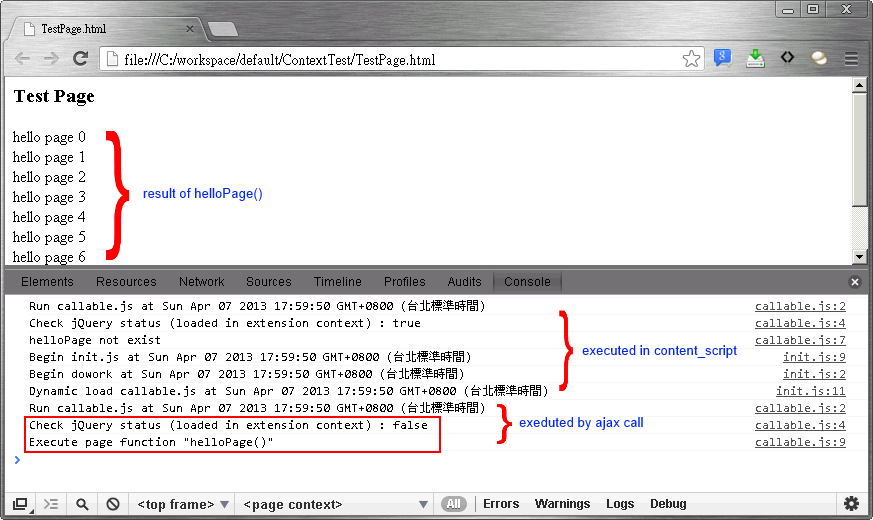
Afterwords
Althouth this could inject script into page context, but this may cause some security issue. And it was not the result that I expected, I hope this will be fixed in the future.


