 Posts



General > Keys
Search word completion
Click Unbind Command button

Change binding to Alt + /


Chrome extension works on separate sandbox environment while it running. This means extension can't call script functions that loaded on page context. Due to a unexpected reason, I found a method that allow extension call functions loaded on page context from extension.
<html xmlns="http://www.w3.org/1999/xhtml">
<head runat="server">
<meta http-equiv="Content-Type" content="text/html; charset=utf-8" />
<title></title>
<script type="text/javascript">
    function helloPage() {
        for ( var i = 0; i < 10; i++) {
            var div = document.createElement('div');
            div.innerHTML = 'hello page ' + i;
            document.body.appendChild(div);
        }
    }
</script>
</head>
<body>
    <h3>Test Page</h3>
</body>
</html>
{
    "manifest_version": 2,
    "name": "Context test",
    "description": "Context test",
    "version": "0.3.1",
    "permissions": ["tabs", "http://*/*", "https://*/*"],
    "content_scripts": [{
        "matches": ["http://*/*", "https://*/*", "file://*/*"],
        "js": ["js/jquery-1.9.1.min.js", "js/init.js", "js/callable.js"],
        "run_at": "document_end"
    }],
    "web_accessible_resources": ["js/callable.js"]
}
function dowork($callback) {
    console.log('Begin dowork at ' + new Date());
    if($callback && typeof ($callback) == 'function') $callback();
}
$(function () {
    console.log('Begin init.js at ' + new Date());
    dowork(function () {
        console.log('Dynamic load callable.js at ' + new Date());
        $.ajax({
            async: false,
            url: chrome.extension.getURL('js/callable.js'),
            dataType: 'script'
        });
    });
});
(function () {
    console.log('Run callable.js at ' + new Date());
    console.log('Check jQuery status (loaded in extension context) : ' + (typeof ($) != 'undefined').toString());
    if(typeof (helloPage) == 'undefined') {
        console.log('helloPage not exist');
    } else {
        console.log('Execute page function "helloPage()"');
        helloPage();
    }
})();
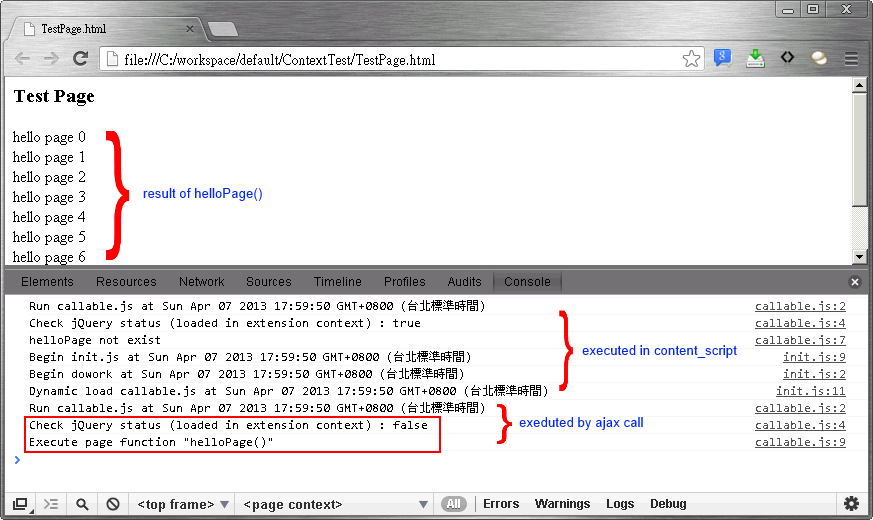
Althouth this could inject script into page context, but this may cause some security issue. And it was not the result that I expected, I hope this will be fixed in the future.
It's easy to view cookies at a web site

Simply add a new cookie


Change cookie value if you need

(function (href) {
    var $a = document.createElement('a');
    $a.href = href;
    return $a;
})('http://nanashi07.blogspot.tw/2013/03/quickly-parse-domain-name-from-url.html').hostname
<img alt="" src="data:image/gif;base64,R0lGODlhAQABAIAAAAAAAP///yH5BAEAAAAALAAAAAABAAEAAAIBRAA7" />

1. Create the first workflow as a trigger. This workflow will start another workflow by update current item as last action. Pause for 5 minutes is to avoid parallel execution.

2. Create the second workflow which do some action and update current item for continue loop. In this case, these two workflow will execute every day and check for status and sending mail.

// Query html
$x('//textarea[@id="source"]')
// Query xml
$xml = $.parseXML($('#source').val())
$x('//item[@group="true"]', $xml)

using System;
using System.Collections.Generic;
using System.IO;
using System.Linq;
using System.Text;
using System.Web;

namespace TestWebApplication
{
    public class ResponseSniffModule : IHttpModule
    {
        public void Dispose()
        {

        }

        public void Init(HttpApplication context)
        {
            context.PreRequestHandlerExecute += context_PreRequestHandlerExecute;
            context.PreSendRequestContent += context_PreSendRequestContent;
        }

        void context_PreRequestHandlerExecute(object sender, EventArgs e)
        {
            var application = sender as HttpApplication;
            var context = application.Context;
            var response = context.Response;

            // Add a filter to capture response stream
            response.Filter = new ResponseSniffer(response.Filter);
        }

        void context_PreSendRequestContent(object sender, EventArgs e)
        {
            var application = sender as HttpApplication;
            var context = application.Context;
            var response = context.Response;

            var filter = response.Filter as ResponseSniffer;

            if (filter != null)
            {
                var reader = new StreamReader(new MemoryStream(filter.RecordStream.GetBuffer()));
                var source = reader.ReadToEnd();
            }
        }
    }

    public class ResponseSniffer : Stream
    {
        private readonly Stream ResponseStream;

        public MemoryStream RecordStream { get; set; }

        #region Implements of Stream
        public override bool CanRead
        {
            get { return ResponseStream.CanRead; }
        }

        public override bool CanSeek
        {
            get { return ResponseStream.CanSeek; }
        }

        public override bool CanWrite
        {
            get { return ResponseStream.CanWrite; }
        }

        public override void Flush()
        {
            ResponseStream.Flush();
        }

        public override long Length
        {
            get { return ResponseStream.Length; }
        }

        public override long Position
        {
            get
            {
                return ResponseStream.Position;
            }
            set
            {
                ResponseStream.Position = value;
            }
        }

        public override int Read(byte[] buffer, int offset, int count)
        {
            return ResponseStream.Read(buffer, offset, count);
        }

        public override long Seek(long offset, SeekOrigin origin)
        {
            return Seek(offset, origin);
        }

        public override void SetLength(long value)
        {
            ResponseStream.SetLength(value);
        }

        public override void Write(byte[] buffer, int offset, int count)
        {
            RecordStream.Write(buffer, offset, count);
            ResponseStream.Write(buffer, offset, count);
        }
        #endregion

        public ResponseSniffer(Stream stream)
        {
            RecordStream = new MemoryStream();
            ResponseStream = stream;
        }
    }
}
