Popular Posts
Enable SSL connection for Jsoup import org.jsoup.Connection; import org.jsoup.Jsoup; import javax.net.ssl.*; import java.io.IOException; import java.security.KeyManagement... Get files name in batch Windows Batch : get filename using [%%~ni] Linux Shell Script : get filename using [awk, sed] windows sample : rename all *.htm file to ... Translating 2.0 <html> <head>     <title>Translation 2.0</title>     <meta http-equiv="content-type" content="text...
Stats
Action results
  • ActionResult

    Encapsulates the result of an action method and is used to perform a framework-level operation on behalf of the action method.
    public ActionResult Index()
    {
        return Show();
    }
    
    public ActionResult Show()
    {
        return View();
    }
    
  • ContentResult

    Represents a user-defined content type that is the result of an action method.
    public ActionResult Index()
    {
        return Content("Represents a user-defined content type that is the result of an action method.", "text/plain", System.Text.Encoding.UTF8);
    }
  • EmptyResult

    Represents a result that does nothing, such as a controller action method that returns nothing.
    public ActionResult Index()
    {
        return new EmptyResult();
    }
  • FileContentResult

    Sends the contents of a binary file to the response.
    public ActionResult Index()
    {
        //return new FileContentResult(Buffer, "application/pdf");
        return File(Buffer, "application/pdf");
    }
  • FilePathResult

    Sends the contents of a file to the response.
    public ActionResult Index()
    {
        return File(Server.MapPath("~/doc/sample.pdf"), "application/pdf");
    }
  • FileStreamResult

    Sends binary content to the response by using a Stream instance.
    public ActionResult Index()
    {
        using (var ms = new System.IO.MemoryStream())
        {
            TempImage.Save(ms, System.Drawing.Imaging.ImageFormat.Png);
            //return new FileStreamResult(ms, "image/png") { FileDownloadName = "logo.png" };
            return File(ms, "image/png", "logo.png");
        }
    }
  • HttpNotFoundResult

    Defines an object that is used to indicate that the requested resource was not found.
    public ActionResult Index()
    {
        return HttpNotFound("Page not fould");
    }
  • HttpStatusCodeResult

    Provides a way to return an action result with a specific HTTP response status code and description.
    public ActionResult Index()
    {
        return new HttpStatusCodeResult(System.Net.HttpStatusCode.Unauthorized);
    }
  • HttpUnauthorizedResult

    Represents the result of an unauthorized HTTP request.
    public ActionResult Index()
    {
        return new HttpUnauthorizedResult("Please sign in");
    }
  • JavaScriptResult

    Sends JavaScript content to the response.
    public ActionResult Index()
    {
        return JavaScript("alert(new Date());");
    }
  • JsonResult

    Represents a class that is used to send JSON-formatted content to the response.
    public ActionResult Index()
    {
        return Json(new { Message = "Represents a class that is used to send JSON-formatted content to the response." });
    }
  • PartialViewResult

    Represents a base class that is used to send a partial view to the response.
    public ActionResult Index()
    {
        return PartialView();
    }
  • RedirectResult

    Controls the processing of application actions by redirecting to a specified URI.
    public ActionResult Index()
    {
        //return Redirect("/Product");  // 302
        return RedirectPermanent("/Product");  // 301
    }
    Redirect and RedirectPermanent
  • RedirectToRouteResult

    Represents a result that performs a redirection by using the specified route values dictionary.
    public ActionResult Index()
    {
        //return RedirectToAction("Show");
        //return RedirectToActionPermanent("Show");
        //return RedirectToRoute(new { action = "Show" });
        return RedirectToRoute(new { action = "Show" });
    }
  • ViewResult

    Represents a class that is used to render a view by using an IView instance that is returned by an IViewEngine object.
    public ActionResult Index()
    {
        return View();
    }
Action attributes
  • AcceptVerbsAttribute

    Represents an attribute that specifies which HTTP verbs an action method will respond to.
    [AcceptVerbs(HttpVerbs.Get)]
    public ActionResult Index() { return View(); }
    [AcceptVerbs("get", "post")]
    public ActionResult Index() { return View(); }
  • ActionFilterAttribute

    Represents the base class for filter attributes.
    public class PermissionFilterAttribute : ActionFilterAttribute
    {
        public override void OnActionExecuted(ActionExecutedContext filterContext)
        {
            base.OnActionExecuted(filterContext);
        }
        public override void OnActionExecuting(ActionExecutingContext filterContext)
        {
            base.OnActionExecuting(filterContext);
        }
        public override void OnResultExecuted(ResultExecutedContext filterContext)
        {
            base.OnResultExecuted(filterContext);
        }
        public override void OnResultExecuting(ResultExecutingContext filterContext)
        {
            base.OnResultExecuting(filterContext);
        }
    }
  • ActionMethodSelectorAttribute

    Represents an attribute that is used to influence the selection of an action method.
    public class RequestSourceFilterAttribute : ActionMethodSelectorAttribute
    {
        public override bool IsValidForRequest(ControllerContext controllerContext, System.Reflection.MethodInfo methodInfo)
        {
            throw new NotImplementedException();
        }
    }
  • ActionNameAttribute

    Represents an attribute that is used for the name of an action.
    [ActionName("Substitute")]
    public ActionResult Index() { return View(); }
  • ActionNameSelectorAttribute

    Represents an attribute that affects the selection of an action method.
    public class RequestSourceFilterAttribute : ActionNameSelectorAttribute
    {
        public override bool IsValidName(ControllerContext controllerContext, string actionName, System.Reflection.MethodInfo methodInfo)
        {
            throw new NotImplementedException();
        }
    }
  • AllowHtmlAttribute

    Allows a request to include HTML markup during model binding by skipping request validation for the property. (It is strongly recommended that your application explicitly check all models where you disable request validation in order to prevent script exploits.)
    [AllowHtml]
    public ActionResult Index() { return View(); }
  • AsyncTimeoutAttribute

    Represents an attribute that is used to set the timeout value, in milliseconds, for an asynchronous method.
    [AsyncTimeout(1000000)] // In milliseconds.
    public ActionResult Index() { return View(); }
  • AuthorizeAttribute

    Represents an attribute that is used to restrict access by callers to an action method.
    [Authorize(Users = "Betty, Johnny", Roles = "Admin, Super User")]
    public ActionResult Index() { return View(); }
    public class ApplicationAuthorizaeAttribute : AuthorizeAttribute
    {
        protected override bool AuthorizeCore(HttpContextBase httpContext)
        {
            return base.AuthorizeCore(httpContext);
        }
        protected override void HandleUnauthorizedRequest(AuthorizationContext filterContext)
        {
            base.HandleUnauthorizedRequest(filterContext);
        }
        public override void OnAuthorization(AuthorizationContext filterContext)
        {
            base.OnAuthorization(filterContext);
        }
        protected override HttpValidationStatus OnCacheAuthorization(HttpContextBase httpContext)
        {
            return base.OnCacheAuthorization(httpContext);
        }
    }
  • ChildActionOnlyAttribute

    Represents an attribute that is used to indicate that an action method should be called only as a child action.
    [ChildActionOnly]
    public ActionResult Index() { return View(); }
    @{Html.RenderAction("Index");}
  • FilterAttribute

    Represents the base class for action and result filter attributes.
    public class BaseFileter : FilterAttribute
    {
        public override bool IsDefaultAttribute()
        {
            return base.IsDefaultAttribute();
        }
        public override bool Match(object obj)
        {
            return base.Match(obj);
        }
    }
  • HandleErrorAttribute

    Represents an attribute that is used to handle an exception that is thrown by an action method.
    [HandleError(Master = "Site", View = "Error", ExceptionType = typeof(NullReferenceException))]
    public ActionResult Index() { return View(); }
  • HttpDeleteAttribute

    Represents an attribute that is used to restrict an action method so that the method handles only HTTP DELETE requests.
    [HttpDelete]
    public ActionResult Index() { return View(); }
  • HttpGetAttribute

    Represents an attribute that is used to restrict an action method so that the method handles only HTTP GET requests.
    [HttpGet]
    public ActionResult Index() { return View(); }
  • HttpPostAttribute

    Represents an attribute that is used to restrict an action method so that the method handles only HTTP POST requests.
    [HttpPost]
    public ActionResult Index() { return View(); }
  • HttpPutAttribute

    Represents an attribute that is used to restrict an action method so that the method handles only HTTP PUT requests.
    [HttpPut]
    public ActionResult Index() { return View(); }
  • NonActionAttribute

    Represents an attribute that is used to indicate that a controller method is not an action method.
    [NonAction]  // Prevent called from url
    public void InnerCall() { Response.Write("Hello InnerCall"); Response.End(); }
  • OutputCacheAttribute

    Represents an attribute that is used to mark an action method whose output will be cached.
    [OutputCache(Duration = 60, VaryByParam = "page")]
    public ActionResult Index() { return View(); }
  • RequireHttpsAttribute

    Represents an attribute that forces an unsecured HTTP request to be re-sent over HTTPS.
    [RequireHttps]
    public ActionResult Index() { return View(); }
  • SessionStateAttribute

    Specifies the session state of the controller.
    [SessionState(System.Web.SessionState.SessionStateBehavior.Required)]
    public ActionResult Index() { return View(); }
  • ValidateInputAttribute

    Represents an attribute that is used to mark action methods whose input must be validated.
    [ValidateInput(false)]
    public ActionResult Index() { return View(); }
Customize facebook share content
<html>
<head>
    <title>Custimize share content to FB</title>
    <!-- Customize share title -->
    <meta name="title" content="Shared content Title" />
    <!-- Customize share description -->
    <meta name="description" content="Shared content description" />
    <!-- Customize share image -->
    <link rel="image_src" href="https://blogger.googleusercontent.com/img/b/R29vZ2xl/AVvXsEiakCBGuDHB1HyNK7hmHBiQpP-nt897DSNKou8Y4XLIuKOnX7wyHIPhBBsmRnD7VgUXAh-nc-nxBtxXxTuiEhjgiuUPG0Kh63ICOnsbaw7cHq9cBmqj9DNhPxActjzwhJDh_xYMCauHVnmf/s296-no/QR_http___nanashi07_blogspo.png" />
</head>
<body>
    <a href="https://www.facebook.com/sharer/sharer.php?src=bm&u=http://nanashi07.blogspot.com">Share this page to FB</a>
</body>
</html>
or
<html>
<head>
    <title>Custimize share content to FB</title>
    <!-- Customize share title -->
    <meta property="og:title" content="Shared content Title" />
    <!-- Customize share description -->
    <meta property="og:description" content="Shared content description" />
    <!-- Customize share image -->
    <meta property="og:image" content="https://blogger.googleusercontent.com/img/b/R29vZ2xl/AVvXsEiakCBGuDHB1HyNK7hmHBiQpP-nt897DSNKou8Y4XLIuKOnX7wyHIPhBBsmRnD7VgUXAh-nc-nxBtxXxTuiEhjgiuUPG0Kh63ICOnsbaw7cHq9cBmqj9DNhPxActjzwhJDh_xYMCauHVnmf/s296-no/QR_http___nanashi07_blogspo.png" />
    <!-- Customize share url -->
    <meta property="og:url" content="http://nanashi07.blogspot.com" />
    <!-- Customize share image -->
    <link href="https://blogger.googleusercontent.com/img/b/R29vZ2xl/AVvXsEiakCBGuDHB1HyNK7hmHBiQpP-nt897DSNKou8Y4XLIuKOnX7wyHIPhBBsmRnD7VgUXAh-nc-nxBtxXxTuiEhjgiuUPG0Kh63ICOnsbaw7cHq9cBmqj9DNhPxActjzwhJDh_xYMCauHVnmf/s296-no/QR_http___nanashi07_blogspo.png" rel="image_src" type="image/jpeg" /
</head>
<body>
    <a href="https://www.facebook.com/sharer/sharer.php?src=bm&u=http://nanashi07.blogspot.com">Share this page to FB</a>
<body>
</html>
pushState & ajax page loading
Index.cshtml
<html>
<head>
    <title></title>
    <link href="//netdna.bootstrapcdn.com/twitter-bootstrap/2.3.2/css/bootstrap-combined.min.css" rel="stylesheet">
    <style>
        #root-container {
            margin: 20px;
        }
    </style>
    <script src="http://code.jquery.com/jquery-1.10.1.min.js"></script>
    <script src="//netdna.bootstrapcdn.com/twitter-bootstrap/2.3.2/js/bootstrap.min.js"></script>
    <script>
        $(function () {
            $('.nav li a').click(function () {
                $(this).parentsUntil('#root-container').last().children().removeClass('active');

                var $url = $(this).attr('href');
                $.ajax({
                    url: $url,
                    type: 'POST',
                    success: function ($data) {
                        $('#tab-container').html($data);
                    }
                });

                if (location.pathname != $url) {
                    window.history.pushState({ path: $url }, $(this).text(), $url);
                }

                $(this).parent().addClass('active');
                return false;
            });

            $('.nav li a').each(function () {
                if (location.pathname == $(this).attr('href')) {
                    $(this).click();
                    return false;
                }
            });

            if ($('.nav li.active').size() == 0) {
                $('.nav li a').first().click();
            }
        });
    </script>
</head>
<body>
    <input type="hidden" id="current-path" value="@ViewBag.CurrentPath" />
    <div id="root-container">
        <ul class="nav nav-tabs">
            <li><a href="~/Home/jQuery">What is jQuery?</a></li>
            <li><a href="~/Home/jQueryUI">jQueryUI</a></li>
            <li><a href="~/Home/Bootstrap">Bootstrap</a></li>
        </ul>
        <div id="tab-container"></div>
    </div>
</body>
</html>
HomeController.cs
using System;
using System.Collections.Generic;
using System.Linq;
using System.Web;
using System.Web.Mvc;

namespace MvcApplication1.Controllers
{
    public class HomeController : Controller
    {
        public ActionResult Index()
        {
            ViewBag.CurrentPath = Request.Url.AbsolutePath;
            return View();
        }

        public ActionResult jQuery()
        {
            switch (Request.HttpMethod)
            {
                case "POST":
                    return View();
                default:
                    return View("Index");
            }
        }

        public ActionResult jQueryUI()
        {
            switch (Request.HttpMethod)
            {
                case "POST":
                    return View();
                default:
                    return View("Index");
            }
        }

        public ActionResult Bootstrap()
        {
            switch (Request.HttpMethod)
            {
                case "POST":
                    return View();
                default:
                    return View("Index");
            }
        }
    }
}

Reference: Manipulating the browser history

Get DB Connection that store in Security store
using System;
using System.Collections.Generic;
using System.Linq;
using System.Text;
using System.Runtime.InteropServices;
using Microsoft.SharePoint;
using Microsoft.BusinessData.Infrastructure.SecureStore;
using Microsoft.Office.SecureStoreService.Server;
using Microsoft.SharePoint.Administration;
using System.Security;
using Microsoft.SharePoint.Administration.Claims;
using System.Globalization;
using Microsoft.SharePoint.Utilities;
using System.Security.Principal;
using Microsoft.Office.Server.Diagnostics;
using System.Web;

namespace sharepoint.util
{
    public class SecureStoreCredentialLib
    {
        private const string SYSTEMACCOUNT = @"domain\\ishareadmin";

        /// <summary>
        /// Get DB Connection that store in Security store. You should add a Generic field to save your DB Instance.
        /// </summary>
        /// <param name="CredentialName"></param>
        /// <returns></returns>
        public string GetConnectionString(string CredentialName)
        {
            var connection = string.Empty;
            var username = string.Empty;
            var password = string.Empty;
            var dbinstance = string.Empty;

            SecureStoreCredentialCollection credentials = null;
            SPSecurity.RunWithElevatedPrivileges(() =>
            {
                SPContext.Current.Web.AllowUnsafeUpdates = true;
                var adminUser = SPContext.Current.Web.EnsureUser(SYSTEMACCOUNT);
                SPContext.Current.Web.AllowUnsafeUpdates = false;
                using (var site = new SPSite(SPContext.Current.Site.ID, adminUser.UserToken))
                {
                    var provider = new SecureStoreProvider();
                    var context = SPServiceContext.GetContext(site);
                    provider.Context = context;
                    credentials = provider.GetCredentials(CredentialName);
                }
            });

            if (credentials != null)
            {
                foreach (SecureStoreCredential sc in credentials)
                {
                    switch (sc.CredentialType)
                    {
                        case SecureStoreCredentialType.Generic:
                            dbinstance = SecureStoreCredentialLib.ToClrString(sc.Credential);
                            break;
                        case SecureStoreCredentialType.Key:
                            break;
                        case SecureStoreCredentialType.Password:
                            password = SecureStoreCredentialLib.ToClrString(sc.Credential);
                            break;
                        case SecureStoreCredentialType.Pin:
                            break;
                        case SecureStoreCredentialType.UserName:
                            username = SecureStoreCredentialLib.ToClrString(sc.Credential);
                            break;
                        case SecureStoreCredentialType.WindowsPassword:
                            break;
                        case SecureStoreCredentialType.WindowsUserName:
                            break;
                        default:
                            break;
                    }
                }

                connection = string.Format(
                    "Data Source={0};Initial Catalog=iShare2_SiteInfo;User ID={1};Password={2};Persist Security Info=True;",
                    dbinstance,
                    username,
                    password
                );
            }
            else
            {
                throw new Exception("Credentials is null. Cannot get credentials.");
            }

            return connection;
        }

        public SecureStoreCredentialCollection GetCredentials(string targetApplicationID)
        {
            SecureStoreCredentialCollection credentials = null;

            var iss = GetISecureStore();
            var app = iss.GetApplication(targetApplicationID);

            switch (app.Type)
            {
                case TargetApplicationType.Group:
                case TargetApplicationType.Individual:
                    credentials = iss.GetCredentials(targetApplicationID);
                    break;
                case TargetApplicationType.GroupWithTicketing:
                case TargetApplicationType.IndividualWithTicketing:
                    //Didn't test...
                    var ticket = iss.IssueTicket();
                    credentials = iss.RedeemTicket(targetApplicationID, ticket);
                    break;
                case TargetApplicationType.RestrictedGroup:
                case TargetApplicationType.RestrictedIndividual:
                    break;
                default:
                    break;
            }

            return credentials;
        }


        public void AddCredentials(string userName, string userPassword, string DBInstance, string targetApplicationID, string targetApplicationContactEmail)
        {
            CreateTargetApplication(targetApplicationID, targetApplicationContactEmail);

            var iss = GetISecureStore();
            var applicationFields = iss.GetApplicationFields(targetApplicationID);
            var creds = new List<ISecureStoreCredential>(applicationFields.Count);
            var ssClaims = iss.GetApplicationAdministratorClaims(targetApplicationID);

            using (var credentials = new SecureStoreCredentialCollection(creds))
            {
                foreach (var ssClaim in ssClaims)
                {
                    foreach (var taf in applicationFields)
                    {
                        switch (taf.CredentialType)
                        {
                            case SecureStoreCredentialType.Generic:
                                creds.Add(new SecureStoreCredential(MakeSecureString(DBInstance), SecureStoreCredentialType.Generic));
                                break;
                            case SecureStoreCredentialType.Key:
                                break;
                            case SecureStoreCredentialType.Password:
                                creds.Add(new SecureStoreCredential(MakeSecureString(userPassword), SecureStoreCredentialType.Password));
                                break;
                            case SecureStoreCredentialType.Pin:
                                break;
                            case SecureStoreCredentialType.UserName:
                                creds.Add(new SecureStoreCredential(MakeSecureString(userName), SecureStoreCredentialType.UserName));
                                break;
                            case SecureStoreCredentialType.WindowsPassword:
                                break;
                            case SecureStoreCredentialType.WindowsUserName:
                                break;
                            default:
                                break;
                        }
                    }

                    iss.SetCredentials(targetApplicationID, credentials);
                    iss.SetUserCredentials(targetApplicationID, ssClaim, credentials);
                }
            }
        }


        public void CreateTargetApplication(string targetApplicationID, string targetApplicationContactEmail)
        {
            var iss = GetISecureStore();
            var apps = iss.GetApplications();
            var result = apps.Where(a => a.ApplicationId == targetApplicationID);

            if (result.Count() == 0)
            {
                var ta = new TargetApplication(
                    targetApplicationID,
                    targetApplicationID,
                    targetApplicationContactEmail,
                    20,
                    TargetApplicationType.Individual,
                    null
                );
                var taf1 = new TargetApplicationField("UserName", false, SecureStoreCredentialType.UserName);
                var taf2 = new TargetApplicationField("Password", true, SecureStoreCredentialType.Password);
                var taf3 = new TargetApplicationField("DBInstance", false, SecureStoreCredentialType.Generic);
                var oSecureStoreServiceClaimList = new List<SecureStoreServiceClaim>();
                var claim = SPClaimProviderManager.CreateUserClaim(SYSTEMACCOUNT, SPOriginalIssuerType.Windows);
                var adminClaim = new SecureStoreServiceClaim(claim);
                oSecureStoreServiceClaimList.Add(adminClaim);
                var claimcurrent = SPClaimProviderManager.CreateUserClaim(WindowsIdentity.GetCurrent().Name, SPOriginalIssuerType.Windows);
                var ssClaimCurrent = new SecureStoreServiceClaim(claimcurrent);
                oSecureStoreServiceClaimList.Add(ssClaimCurrent);
                var targetClaims = new TargetApplicationClaims(oSecureStoreServiceClaimList, null, null);
                iss.CreateApplication(ta, new List<TargetApplicationField>() { taf1, taf2, taf3 }, targetClaims);
            }
        }

        public void DeleteTargetApplication(string targetApplicationID)
        {
            var iss = GetISecureStore();
            var apps = iss.GetApplications();
            var result = apps.Where(a => a.ApplicationId == targetApplicationID);

            if (result.Count() > 0)
            {
                iss.DeleteApplication(targetApplicationID);
            }
        }

        #region private method
        private static string ToClrString(System.Security.SecureString secureString)
        {
            var ptr = Marshal.SecureStringToBSTR(secureString);
            try
            {
                return Marshal.PtrToStringBSTR(ptr);
            }
            finally
            {
                Marshal.FreeBSTR(ptr);
            }
        }

        private static SecureString MakeSecureString(string value)
        {
            if (value == null)
            {
                return null;
            }

            var secureContent = new SecureString();
            var chArray = value.ToCharArray();

            for (int i = 0; i < chArray.Length; i++)
            {
                secureContent.AppendChar(chArray[i]);
                chArray[i] = '0';
            }
            return secureContent;
        }

        private ISecureStore GetISecureStore()
        {
            var context = SPServiceContext.GetContext(SPServiceApplicationProxyGroup.Default, SPSiteSubscriptionIdentifier.Default);
            var ssp = new SecureStoreServiceProxy();
            var iss = ssp.GetSecureStore(context);
            return iss;
        }

        private static SPSite GetCentralAdminSite()
        {
            var adminWebApp = SPAdministrationWebApplication.Local;
            SPSite adminSite = null;
            if (adminWebApp != null)
            {
                var adminSiteUri = adminWebApp.GetResponseUri(SPUrlZone.Default);
                if (adminSiteUri != null)
                {
                    adminSite = adminWebApp.Sites[adminSiteUri.AbsoluteUri];
                }
            }
            return adminSite;
        }
        #endregion
    }
}
Reference : Code Snippet: Get User Credentials Using the Default Secure Store Provider
Temporary Tables

Temporary Table

create table #temptable {
 id int,
 name nvarchar(50)
};
select * into #temptable from UserTable;
Features
  • Table name begin with '#'
  • Table will be automatically dropped when session closed
  • Manually drop table will be suggested
  • Temporary table will be stored at database 'tempdb'
  • Different session/user can create temporary table with same table name
  • Index supported

Table Variables

declare @temptable table{
 id int,
 name nvarchar(50)
};
Features
  • Table name begin with '@'
  • Table do not need drop
  • Table data only exist in memory
  • Can not create from select statement
jQuery.validationEngine
The following attribute's value will be loaded for the relative validation rule:
data-errormessage-value-missing
  • required
  • groupRequired
  • condRequired
data-errormessage-type-mismatch
  • past
  • future
  • dateRange
  • dateTimeRange
data-errormessage-pattern-mismatch
  • creditCard
  • equals
data-errormessage-range-underflow
  • minSize
  • min
  • minCheckbox
data-errormessage-range-overflow
  • maxSize
  • max
  • maxCheckbox
data-errormessage-custom-error
  • custom
  • ajax
  • funcCall
data-errormessage
  • a generic fall-back error message

Validators
  • required : Speaks for itself, fails if the element has no value. This validator can apply to pretty much any kind of input field.
  • groupRequired : At least one of the field of the group must be filled. It needs to be given a group name that is unique across the form.
  • condRequired : This makes the field required, but only if any of the referred fields has a value.
  • custom[regex_name] : Validates the element's value to a predefined list of regular expressions.
  • custom[function_name] : Validates the element's value to a predefined function included in the language file (compared to funcCall that can be anywhere in your application),
  • funcCall[methodName] : Validates a field using a third party function call. If a validation error occurs, the function must return an error message that will automatically show in the error prompt.
  • ajax[selector] : Delegates the validation to a server URL using an asynchronous Ajax request. The selector is used to identify a block of properties in the translation file, take the following for example.
  • equals[field.id] : Checks if the current field's value equals the value of the specified field.
  • min[float] : Validates when the field's value is less than, or equal to, the given parameter.
  • max[float] : Validates when the field's value is more than, or equal to, the given parameter.
  • minSize[integer] : Validates if the element content size (in characters) is more than, or equal to, the given integer. integer <= input.value.length
  • maxSize[integer] : Validates if the element content size (in characters) is less than, or equal to, the given integer. input.value.length <= integer
  • past[NOW, a date or another element's name] : Checks if the element's value (which is implicitly a date) is earlier than the given date. When "NOW" is used as a parameter, the date will be calculate in the browser. When a "#field name" is used ( The '#' is optional ), it will compare the element's value with another element's value within the same form. Note that this may be different from the server date. Dates use the ISO format YYYY-MM-DD
  • future[NOW, a date or another element's name] : Checks if the element's value (which is implicitly a date) is greater than the given date. When "NOW" is used as a parameter, the date will be calculate in the browser. When a "#field name" is used ( The '#' is optional ), it will compare the element's value with another element's value within the same form. Note that this may be different from the server date. Dates use the ISO format YYYY-MM-DD
  • minCheckbox[integer] : Validates when a minimum of integer checkboxes are selected. The validator uses a special naming convention to identify the checkboxes as part of a group.
  • maxCheckbox[integer] : Same as above but limits the maximum number of selected check boxes.
  • creditCard : Validates that a credit card number is at least theoretically valid, according the to the Luhn checksum algorithm, but not whether the specific card number is active with a bank, etc.

Custom Regex
  • phone
  • url
  • email
  • date
  • number
  • integer
  • ipv4
  • onlyNumberSp
  • onlyLetterSp
  • onlyLetterNumber
Custom prompt position
  • data-prompt-position : topLeft, topRight, centerRight, bottomLeft, bottomRight, inline
Ignore validate
Catpture webpage snapshot by form control
[STAThread]
static Image Capture(string url, int width, int height)
{
    WebBrowser wb = new WebBrowser();

    wb.Navigate(url);
    wb.ScrollBarsEnabled = false;
    wb.ScriptErrorsSuppressed = false;

    while (wb.ReadyState != WebBrowserReadyState.Complete)
    {
        Application.DoEvents();
    }

    // Set the size of the WebBrowser control
    wb.Width = width;
    wb.Height = height;

    if (width == -1)
    {
        // Take Screenshot of the web pages full width
        wb.Width = wb.Document.Body.ScrollRectangle.Width;
    }

    if (height == -1)
    {
        // Take Screenshot of the web pages full height
        wb.Height = wb.Document.Body.ScrollRectangle.Height;
    }

    // Get a Bitmap representation of the webpage as it's rendered in the WebBrowser control
    Bitmap bitmap = new Bitmap(wb.Width, wb.Height);
    wb.DrawToBitmap(bitmap, new Rectangle(0, 0, wb.Width, wb.Height));
    wb.Dispose();

    return bitmap;
}
Reset code intelligence on eclipse ADT bundle
Window > Preference >
General > Keys
Search word completion
Click Unbind Command button
Search content assist
Change binding to Alt + /
Execute script loaded on page context

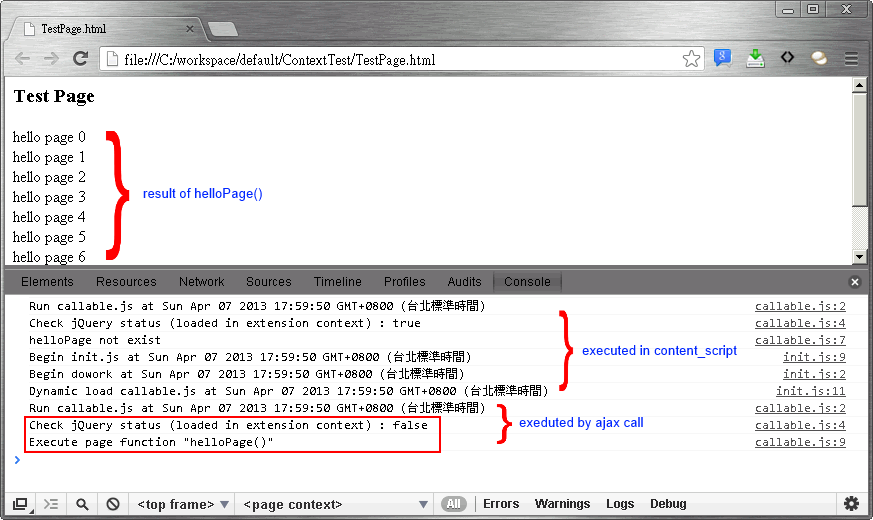
Chrome extension works on separate sandbox environment while it running. This means extension can't call script functions that loaded on page context. Due to a unexpected reason, I found a method that allow extension call functions loaded on page context from extension.

scenario

Target page
There is script function helloPage on target page. Page won't execute this function when page loaded.
<html xmlns="http://www.w3.org/1999/xhtml">
<head runat="server">
<meta http-equiv="Content-Type" content="text/html; charset=utf-8" />
<title></title>
<script type="text/javascript">
    function helloPage() {
        for ( var i = 0; i < 10; i++) {
            var div = document.createElement('div');
            div.innerHTML = 'hello page ' + i;
            document.body.appendChild(div);
        }
    }
</script>
</head>
<body>
    <h3>Test Page</h3>
</body>
</html>
manifest.json
In manifest, extension will execute jQuery, init.js, callable.js when page is loaded, and callable.js is allowed access from web.
{
    "manifest_version": 2,
    "name": "Context test",
    "description": "Context test",
    "version": "0.3.1",
    "permissions": ["tabs", "http://*/*", "https://*/*"],
    "content_scripts": [{
        "matches": ["http://*/*", "https://*/*", "file://*/*"],
        "js": ["js/jquery-1.9.1.min.js", "js/init.js", "js/callable.js"],
        "run_at": "document_end"
    }],
    "web_accessible_resources": ["js/callable.js"]
}
init.js
This script define a function that execute a callback function like delegation. When page loaded, callable.js will be loaded by ajax call.
function dowork($callback) {
    console.log('Begin dowork at ' + new Date());
    if($callback && typeof ($callback) == 'function') $callback();
}
$(function () {
    console.log('Begin init.js at ' + new Date());
    dowork(function () {
        console.log('Dynamic load callable.js at ' + new Date());
        $.ajax({
            async: false,
            url: chrome.extension.getURL('js/callable.js'),
            dataType: 'script'
        });
    });
});
callable.js
In callback.js, it checks jQuery is loaded (should be exist in extension context) or not and print message on console. Then try to execute helloPage on page context.
(function () {
    console.log('Run callable.js at ' + new Date());
    console.log('Check jQuery status (loaded in extension context) : ' + (typeof ($) != 'undefined').toString());
    if(typeof (helloPage) == 'undefined') {
        console.log('helloPage not exist');
    } else {
        console.log('Execute page function "helloPage()"');
        helloPage();
    }
})();
Result
Afterwords

Althouth this could inject script into page context, but this may cause some security issue. And it was not the result that I expected, I hope this will be fixed in the future.