
Popular Posts
Install subversion with apache server on linux (ubuntu) # 更新 apt package sudo apt-get update # 安裝 package sudo apt-get install subversion apache2 libapache2-svn apache2-utils # 建立 svn 資料夾 sudo... Calculated Field Formulas Conditional formulas ... ADD ... THEN ... UNTIL ... data: begin of SERIES, N1 type I value 10, N2 type I value 20, N3 type I value 30, N4 type I value 40, ...
Stats
Generate subversion diff report using python

bash:

svn --diff-cmd "python" --extensions "diff_to_html.py" diff -r 596:671

diff_to_html.py

import sys
import difflib
import os
import argparse

FOLDER_MODIFY = 'modify'
FOLDER_ADD = 'add'
FOLDER_DELETE = 'delete'

# 解析參數
parser = argparse.ArgumentParser()
parser.add_argument('-u', action='store_true')
parser.add_argument('-L', action='store_true')
parser.add_argument('-r', '--report', default='report')
parser.add_argument('-w', '--white-list',
                    nargs='+',
                    default=['.cs', '.csproj', '.config', '.xml', '.sln'])
parser.add_argument('revfrom')
parser.add_argument('revto')
parser.add_argument('filefrom')
parser.add_argument('fileto')
args = parser.parse_args()

from_file = args.revfrom
to_file = args.revto
from_file_path = args.filefrom
to_file_path = args.fileto

output_folder = args.report
white_list = args.white_list

# inject
inject_script = """
    <script>
        document.body.onload = function () {
            readableChange();
        }

        function readableChange() {
            var className = 'diff_chg';
            var lines = getChangedRows(className);

            // 頭尾應為文字內容
            lines.forEach(function (item) {
                var headerText = item.firstChild.data;
                var tailText = item.lastChild.data;
                var fullText = Array.prototype.map.call(item.childNodes, function (child) {
                    return child.nodeType == '3' ? child.data : child.innerText;
                });

                if (headerText !== undefined) {
                    fullText.shift();
                }
                if (tailText !== undefined) {
                    fullText.pop();
                }

                var i = 10;
                while (item.lastChild) {
                    item.removeChild(item.lastChild);
                }

                item.appendChild(document.createTextNode(headerText || ''));
                item.appendChild(createMark(className, fullText))
                item.appendChild(document.createTextNode(tailText || ''));
            })
        }

        function createMark(className, text) {
            var mark = document.createElement('span');
            mark.classList.add(className);
            mark.appendChild(document.createTextNode(text.join('')));
            return mark;
        }

        function getChangedRows(className) {
            var changedLines = Array.prototype.map.call(document.querySelectorAll('.' + className), function (element) {
                return element.parentElement;
            });
            changedLines = changedLines.filter(function (element) {
                return element.tagName == 'TD';
            });
            var lines = [];
            for (var i = 0; i < changedLines.length; i++) {
                var line = changedLines[i];
                if (!lines.find(function (item) {
                    return item == line;
                })) {
                    lines.push(line);
                }
            }
            return lines;
        }
    </script>
"""

inject_styles = """
    <style>
        * {
            font-size: 0.9rem !important;
        }
    </style>
"""


def readlines(path):
    """
    讀取檔案內容
    """
    content = None
    try:
        with open(file=path, mode='rt', encoding='utf-8') as f:
            content = [l for l in f.readlines()]
    except:
        try:
            with open(file=path, mode='rt', encoding='ms950') as f:
                content = [l for l in f.readlines()]
        except:
            print('讀取 {} 失敗'.format(path))
    return content


def execute():
    """
    比對檔案產出 HTML
    """
    print('讀取檔案 {}'.format(to_file_path))
    to_file_content = readlines(to_file_path)
    print('讀取檔案 {}'.format(from_file_path))
    from_file_content = readlines(from_file_path)

    if to_file_content is None or from_file_path is None:
        return

    html = difflib.HtmlDiff().make_file(
        from_file_content, to_file_content, from_file, to_file,  context=True)

    html = html.replace('</head>', inject_styles + '</head>')
    html = html.replace('</body>', inject_script + '</body>')

    output_file = '{}.html'.format(to_file[0: to_file.find('\t')])
    output_file = output_file.replace('/', '_')
    output_file = output_file.replace('\\', '_')

    if len(to_file_content) == 0:
        output_file = os.path.join(output_folder, FOLDER_DELETE, output_file)
        if not os.path.exists(os.path.join(output_folder, FOLDER_DELETE)):
            os.makedirs(os.path.join(output_folder, FOLDER_DELETE))
    elif len(from_file_content) == 0:
        output_file = os.path.join(output_folder, FOLDER_ADD, output_file)
        if not os.path.exists(os.path.join(output_folder, FOLDER_ADD)):
            os.makedirs(os.path.join(output_folder, FOLDER_ADD))
    else:
        output_file = os.path.join(output_folder, FOLDER_MODIFY, output_file)
        if not os.path.exists(os.path.join(output_folder, FOLDER_MODIFY)):
            os.makedirs(os.path.join(output_folder, FOLDER_MODIFY))

    print('寫入檔案 {}'.format(output_file))
    with open(file=output_file, mode='wt', encoding='utf-8') as f:
        f.write(html)


if len([ext for ext in white_list if to_file[0: to_file.find('\t')].lower().endswith(ext.lower())]) > 0:
    execute()
else:
    print('不處理 {} 的檔案比對。'.format(to_file[0: to_file.find('\t')]))

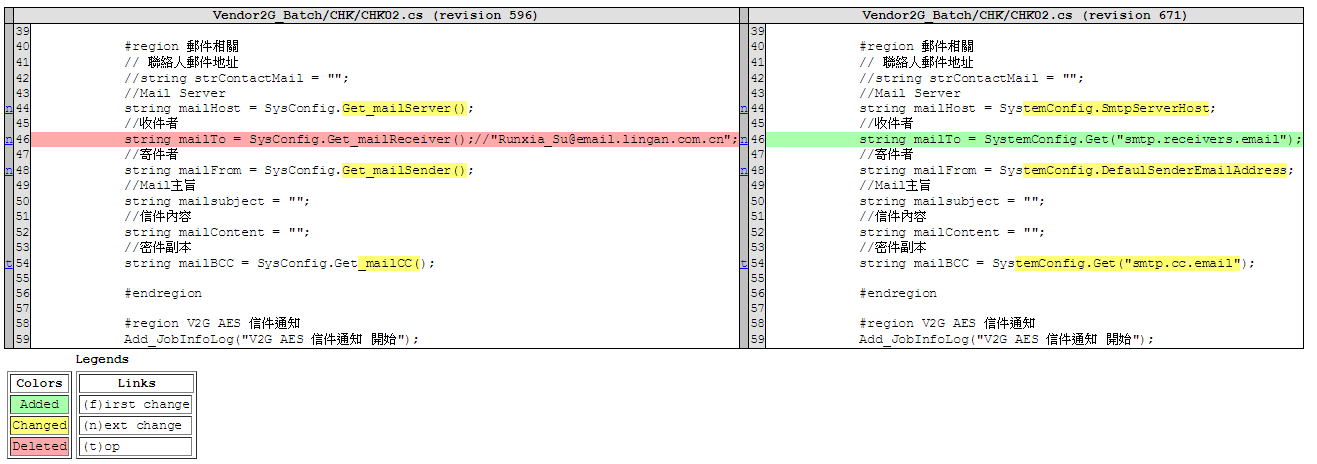
output file:
Expression in polymer
Since Polymer doesn't support expression directly, I create an express function as expression alternative.

Demo

Demo source

<html>
<head>
    <title>Express function for Polymer</title>
    <base href="https://cdn.rawgit.com/download/polymer-cdn/2.0.2/lib/">
    <link rel="import" href="polymer/polymer.html" />
</head>
<body>
    <h1>Expression</h1>
    <expressed-content count="15"></expressed-content>

    <dom-module id="expressed-content">
        <template>
            <template is="dom-repeat" items="[[sequences]]" as="item">
                <!-- This means: -->
                <!-- 1. sqrt(item) as $result -->
                <!-- 2. printText($result, item) as output -->
                <div>[[express(item, sqrt, printText, item)]]</div>
            </template>
        </template>
        <script>
            'use strict';
            class ExpressedContent extends Polymer.Element {

                static get is() { return 'expressed-content'; }

                static get properties() {
                    return {
                        count: {
                            type: Number,
                            value: 10,
                            observer: '_countChanged'
                        },

                        sequences: {
                            type: Array
                        }
                    }
                }

                _countChanged(n, o) {
                    n = Math.max(0, n * 1);
                    let sequences = [];
                    for (let i = 0; i < n; i++) {
                        sequences.push(i + 1);
                    }
                    this.sequences = sequences;
                }

                /**
                 * An express function instead of expression
                 */
                express() {
                    let args = [...arguments];

                    // first argument should be first parameter
                    let params = [args.shift()];
                    // second argument should be a function
                    let fn = args.shift();

                    // arguments before next function will be additional parameters
                    while (args[0] && typeof (args[0]) !== 'function') {
                        params.push(args.shift());
                    }

                    // execute and receive result
                    let nextMainParam = fn.call(this, ...params);

                    // continue express when args is not empty
                    return args.length === 0 ? nextMainParam : this.express(nextMainParam, ...args);
                }

                sqrt(n) {
                    return n * n;
                }

                printText(n1, n2) {
                    return `${n2} x ${n2} = ${n1}`;
                }

            }
            customElements.define(ExpressedContent.is, ExpressedContent);
        </script>
    </dom-module>
</body>
</html>
Javascript lambda: No binding of this
<form>
    <p>
        <button id="f1">Invoke with function</button>
    </p>
    <p>
        <button id="f2">Invoke with lambda</button
    </p>
    <div id="output"></div>
</form>
<script>
    'use strict';
    (function () {
        let f1 = document.querySelector('#f1'),
            f2 = document.querySelector('#f2'),
            output = document.querySelector('#output');

        function appendResult(message) {
            let log = document.createElement('pre');
            log.appendChild(document.createTextNode(message));
            output.appendChild(log);
        }

        // define with function, reference 'this' to button element
        f1.onclick = function () {
            appendResult('Button [Invoke with function] clicked!');
            appendResult('This is: ' + JSON.stringify(this) + ' [' + this.constructor.name + ']');
            console.log(this);
            return false;
        };

        // define with lambda, reference 'this' to {name: 'Bruce'} object
        f2.onclick = () => {
            appendResult('Button [Invoke with lambda] clicked!');
            appendResult('This is: ' + JSON.stringify(this) + ' [' + this.constructor.name + ']');
            console.log(this);
            return false;
        };

    }).call({name: 'Bruce'})
</script>
Result:

Reference: No binding of this
Memo: Debounce Task

To prevent multi-execution from caller in short time, use debounce for single execution.

var debounce = function (func, threshold, execAsap) {
    var timeout;
    return function debounced () {
        var obj = this, args = arguments;
        function delayed () {
            if (!execAsap)
            func.apply(obj, args);
            timeout = null;
        };
        if (timeout)
            clearTimeout(timeout);
        else if (execAsap)
            func.apply(obj, args);
        timeout = setTimeout(delayed, threshold || 100);
    };
}
Compacting VirtualBox Disk Images - Linux Guests
  1. Start the Linux virtual machine;
  2. Clean the free space on the disk of the Linux virtual machine;
    dd if=/dev/zero of=zerofillfile bs=1M
    • if= specifies the input file;
    • /dev/zero indicates a bit-stream of zeros
    • of= specifies the output file
    • zerofillfile name of the file containing the bit-stream of zeros
    • bs= indicates the block size
    • 1M indicates that the block size will be 1 megabyte
    rm zerofillfile
  3. Shutdown the Linux virtual machine;
  4. Use the VirtualBox VBoxManage utility to compact the Linux guest image.

Ref: Compacting VirtualBox Disk Images - Linux Guests

Grant permission for virtualbox shared folder

The regular way of getting access to the files now, is to allow VirtualBox to automount the shared folder (which will make it show up under /media/sf_directory_name) and then to add your regular user to the vboxsf group (as root #).

usermod -aG vboxsf <youruser>
Build an OpenVPN server on android device

Preparation


  1. An android device, in this case, Sony xperia Z is used
  2. Root permission required
  3. Linux Deploy for deploy image via chroot/proot
  4. OpenVPN


Step

1. Root android device for superuser permission
2. Install Linux Deploy from play store or custom apk.
3. Install linux
  • Click download icon to select which image to deploy

  • Select which distribution and suite to use
  • Set user name & password
  • Allow init system
  • Enable SSH server

  • Deploy distribution

  • After installation completed, start linux

4. Connect to android via SSH
5. Install OpenVPN
  • Install required packages
  • Create certification folder and edit vars configuration
  • Edit vars as blow
  • Build ca, server and client certification

  • Copy required certification to the path of openvpn
  • Clone configuration file from sample config
  • Edit server.conf
  • Edit server.conf as blow, modify what your need
  • Modify networking config sysctl.conf
  • Modify content to allow transfer traffic from vpn
  • Make changes work
  • Edit firewall rules
  • Add following content to allow route from vpn subnet to wireless
  • Edit firewall configuration
  • Allow forward policy
  • Add firewall rule for vpn and ssh
  • Make changes work. (In this case, there was some error but I ignore that)
  • Start openvpn
  • Validate result

6. Use vpn client to connect android device
My Conky config

About Conky: Conky is a free, light-weight system monitor for X, that displays any kind of information on your desktop.


Preview:
List changed files between commits
List all changed files between commits of git.
git diff --name-only SHA1 SHA2
or
git diff --name-only HEAD~10 HEAD~5
Problem on result of DexFile.entries()

Recently I upgrade my Android Studio to version 2.0, and try to build and run some app on devices. Unfortunately something goes wrong when app executing. When app invokes DexFile.entries() for the class names, the result between android 4 and 5+ is different.

Android version


Okay, let's do some simple test, here is a brand new project I've currently created. The build config and code is below:
App only invokes DexFile.entries() and show the result on a TextView.
On the result, there is a large difference between android 4.2.2 and android 5.0.0
On version 4.2.2, the listed class count is 1555, but on version 5.0.0, there are only 31 entries return.
build.gradle
apply plugin: 'com.android.application'

android {
    compileSdkVersion 23
    buildToolsVersion "23.0.3"

    defaultConfig {
        applicationId "com.prhythm.myapplication"
        minSdkVersion 14
        targetSdkVersion 23
        versionCode 1
        versionName "1.0"
    }
    buildTypes {
        release {
            minifyEnabled false
            proguardFiles getDefaultProguardFile('proguard-android.txt'), 'proguard-rules.pro'
        }
    }
}

dependencies {
    compile fileTree(dir: 'libs', include: ['*.jar'])
    testCompile 'junit:junit:4.12'
    compile 'com.android.support:appcompat-v7:23.3.0'
}
MainActivity.java
package com.prhythm.myapplication;

import android.os.Bundle;
import android.support.v7.app.AppCompatActivity;
import android.text.TextUtils;
import android.widget.TextView;

import java.io.IOException;
import java.util.ArrayList;
import java.util.Enumeration;
import java.util.List;

import dalvik.system.DexFile;

public class MainActivity extends AppCompatActivity {

    @Override
    protected void onCreate(Bundle savedInstanceState) {
        super.onCreate(savedInstanceState);
        setContentView(R.layout.activity_main);

        TextView text = (TextView) findViewById(R.id.content);

        try {
            List<String> paths = new ArrayList<>();
            DexFile dex = new DexFile(getApplicationInfo().sourceDir);
            for (Enumeration<String> entries = dex.entries(); entries.hasMoreElements(); ) {
                paths.add(entries.nextElement());
            }
            text.append(String.format("Total entry count: %d%n", paths.size()));
            text.append("* " + TextUtils.join("\n* ", paths));
        } catch (IOException e) {
            e.printStackTrace();
        }
    }
}
Run Result on android 4.2.2 & 5.0.0
Solution:

Looks like this issue is related to the new InstantRun feature in the Android Plugin for Gradle 2.0.0. getPackageCodePath() gets a String pointing towards the base.apk file in the Android file system. If we unzip that apk we can find one or several .dex files inside its root folder. The entries obtained from the method df.entries() iterates over the .dex files found in that root folder in order to obtain all of its compiled classes. However, if we are using the new Android Plugin for Gradle, we will only find the .dex related to the android runtime and instant run (packages com.tools.android.fd.runtime, com.tools.android.fd.common and com.tools.android.tools.ir.api). Every other class will be compiled in several .dex files, zipped into a file called instant-run.zip and placed into the root folder of the apk. That's why the code posted in the question is not able to list all the classes within the app. Still, this will only affect Debug builds since the Release ones don't feature InstantRun.

List<String> getClasses() throws IOException {
    List<String> paths = new ArrayList<>();
    File instantRunDir = new File(getBaseContext().getFilesDir(), "instant-run/dex");
    if (instantRunDir.exists()) {
        for (File dexPath : instantRunDir.listFiles()) {
            DexFile dex = new DexFile(dexPath);
            for (Enumeration<String> entries = dex.entries(); entries.hasMoreElements(); ) {
                paths.add(entries.nextElement());
            }
        }
    }

    DexFile dex = new DexFile(getApplicationInfo().sourceDir);
    for (Enumeration<String> entries = dex.entries(); entries.hasMoreElements(); ) {
        paths.add(entries.nextElement());
    }

    return paths;
}
Operate form in WebView and get content
class ContentLoader {
    @JavascriptInterface
    public void load(String body) {
        // do something
    }
}

@Override
protected void onCreate(Bundle savedInstanceState) {
    super.onCreate(savedInstanceState);
    setContentView(R.layout.activity_main);

    WebView webView = createWebView();

    webView.loadUrl("https://www.somedoamin.com/product.jsp");
    // enable javascript
    webView.getSettings().setJavaScriptEnabled(true);
    // add interface
    webView.addJavascriptInterface(new ContentLoader(), "ContentLoader");
    webView.setWebViewClient(new WebViewClient() {

        int action;

        @Override
        public void onPageFinished(WebView view, String url) {
            switch (action) {
                case 0:
                    // fill field and submit
                    view.loadUrl("javascript:{\n" +
                            "\tdocument.querySelector('input[name=cgi_tel_no]').value='12345678';\n" +
                            "\tdocument.querySelector('input[name=cgi_id_no]').value='abcdef';\n" +
                            "\tsubmitMyForm();\n" +
                            "};");
                case 1:
                    // get content from 'ContentLoader' interface
                    view.loadUrl("javascript:{\n" +
                            "\twindow.ContentLoader.load('<body>'+document.body.innerHTML+'</body>');\t\n" +
                            "};");
                    break;
            }

            action++;
        }
    });
}

WebView createWebView() {
    WindowManager windowManager = (WindowManager) getSystemService(WINDOW_SERVICE);
    WindowManager.LayoutParams params = new WindowManager.LayoutParams(WindowManager.LayoutParams.WRAP_CONTENT, WindowManager.LayoutParams.WRAP_CONTENT, WindowManager.LayoutParams.TYPE_SYSTEM_OVERLAY, WindowManager.LayoutParams.FLAG_NOT_TOUCHABLE, PixelFormat.TRANSLUCENT);
    params.gravity = Gravity.TOP | Gravity.LEFT;
    params.x = 0;
    params.y = 0;
    params.width = 0;
    params.height = 0;

    LinearLayout layout = new LinearLayout(this);
    layout.setLayoutParams(new RelativeLayout.LayoutParams(RelativeLayout.LayoutParams.MATCH_PARENT, RelativeLayout.LayoutParams.MATCH_PARENT));

    WebView view = new WebView(this);
    view.setLayoutParams(new LinearLayout.LayoutParams(LinearLayout.LayoutParams.MATCH_PARENT, LinearLayout.LayoutParams.MATCH_PARENT));
    layout.addView(view);

    windowManager.addView(layout, params);

    return view;
}
Gitlab

安裝

線上安裝,支援的 OS 有 Ubuntu、Debian、CentOS、Raspberry PI 2 on Raspbian。直接依照說明即可完成。

建議安裝時也同時下載目前安裝的版本,避免之後有移轉問題需要還原。各版本下載位址為

備份

# 執行備份
gitlab-rake gitlab:backup:create

還原

# 複製備份檔至備份路徑
sudo cp 1493107454_2017_04_25_9.1.0_gitlab_backup.tar /var/opt/gitlab/backups/

# 停止服務
sudo gitlab-ctl stop unicorn
sudo gitlab-ctl stop sidekiq

# 開始還原
sudo gitlab-rake gitlab:backup:restore BACKUP=1493107454_2017_04_25_9.1.0

# 啟動系統
sudo gitlab-ctl start

# 檢查還原結果
sudo gitlab-rake gitlab:check SANITIZE=true

由 SVN 移轉

建立 svn 與 git 作者的 mapping 檔(author.txt)

nanashi07 = Bruce <nanashi07@haha.com>

由 svn 簽出為 git 專案

# clone from svn
# with standard layout(trunk/branches/tags), "-s" argument is required
# "author.txt" contains a list that svn accounts mapping to git authors
git svn clone https://10.10.10.162/svn/caml/Caml.Maker --authors-file=author.txt --no-metadata -s Caml.Maker
cd Caml.Maker
# convert tags
git for-each-ref refs/remotes/tags | cut -d / -f 4- | grep -v @ | while read tagname; do git tag "$tagname" "tags/$tagname"; git branch -r -d "tags/$tagname"; done
# convert branches
git for-each-ref refs/remotes | cut -d / -f 3- | grep -v @ | while read branchname; do git branch "$branchname" "refs/remotes/$branchname"; git branch -r -d "$branchname"; done
# add remote repository
git remote add origin http://nanashi07:password@10.10.10.222/caml/Caml.Maker.git
# push to remote
git push origin --all
cd ..

升級

# 停止服務
sudo gitlab-ctl stop unicorn
sudo gitlab-ctl stop sidekiq
sudo gitlab-ctl stop nginx

# 備份
sudo gitlab-rake gitlab:backup:create

# 安裝下載的檔案
# Ubuntu/Debian:
sudo dpkg -i gitlab_x.x.x-omnibus.xxx.deb

# CentOS:
sudo rpm -Uvh gitlab-x.x.x_xxx.rpm

# 重新設定與啟動
sudo gitlab-ctl reconfigure
sudo gitlab-ctl restart